
Table of Contents
 Mistake 1: Revenue attribution is broken. Mistake 2: Lifecycle stages mean nothing. Mistake 3: You pay for contacts you never email. Mistake 4: You pay for seats nobody uses. Mistake 5: Sales tools go unused. Mistake 6: Workflows are out of control. Mistake 7: Email health scores are low. Mistake 8: Conversion tools are switched off.
Mistake 9: Website traffic goes untracked. Mistake 10: Nobody owns data quality. Are HubSpot portals ready for AI search? What makes well-run HubSpot portals. Top 10 things to fix in your HubSpot portal.
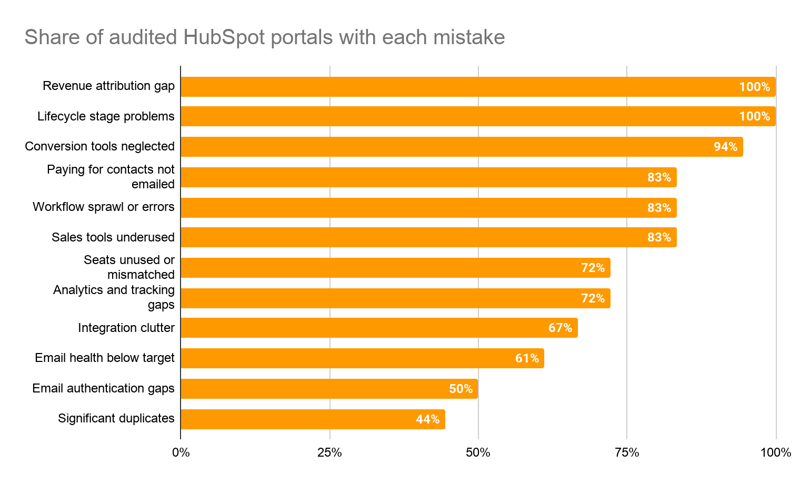
How often does each mistake show up?
|
Finding |
All portals |
Large |
Small and Mid-Sized |
|---|---|---|---|
|
Revenue attribution gap of some kind |
100% |
100% |
100% |
|
Lifecycle stage problems |
100% |
100% |
100% |
|
Website conversion tools neglected |
95% |
100% |
90% |
|
Paying for marketing contacts that are undeliverable or never emailed |
85% |
100% |
75% |
|
Workflow sprawl, errors, or broken routing |
85% |
100% |
75% |
|
Sales Hub tools materially underused |
85% |
60% |
90% |
|
Paid seats unused or mismatched to role |
70% |
80% |
70% |
|
Analytics and tracking gaps |
70% |
60% |
75% |
|
Email health score below target |
60% |
60% |
60% |
|
Deals can be created without a contact |
50% |
40% |
55% |
| Percentages are the share of audited portals where the audit report documented the finding, rounded to the nearest 5%. Full results are in the data appendix at the end of this report and in the companion dataset. |
Who is this report for?
Marketing and revenue operations leaders who own a HubSpot portal and need to justify budget for fixing it. Each section below states the finding, gives a real (anonymized) example, explains the business cost, and lists the fix in the order we would do it.
How was this original research conducted?
This report is original research by Orange Marketing, a HubSpot Diamond Partner based in Newport Beach, California, and its findings are published here for the first time. Companies pay us to audit their HubSpot portals: we record a full walkthrough of the subscription, CRM, Marketing Hub, Sales Hub, Service Hub, automation, reporting, and settings, then deliver a written report with prioritized recommendations.
For this report we selected the audits from 2024 through 2026 with the most complete written reports, drawn from the larger set of portals we have reviewed. We coded each report for 34 recurring findings. A finding counts only if the report states it. If a report did not mention something, it counts as not found, so every percentage here is a minimum.
The portals span B2B software, professional services, financial services, manufacturing, nonprofits, and associations, with record counts from about 1,200 marketing contacts to roughly 1.5 million total records. Several were connected to Salesforce, NetSuite, or other systems.
|
Tier |
Definition used in this report |
Share of audits |
|---|---|---|
|
Large |
Enterprise tier, multi-brand, or 75,000+ records |
About 30% |
|
Small and Mid-Sized |
Professional or Starter tier, single brand, under 75,000 records |
About 70% |
| The Large group is the smaller of the two, so we only call out differences between the groups of 30 percentage points or more. Smaller differences are in the dataset and are not treated as findings. |
Mistake 2: Do your HubSpot lifecycle stages mean anything?
Found in 100% of portals. Lifecycle stage is the backbone of HubSpot funnel reporting, and no portal we audited had it fully right.
What did the audits find?
- 70% had lifecycle stages misused as status fields (active, inactive, do not contact), sprawled into near-duplicates, or customized with no written definitions.
- 40% had no working MQL definition or process. From a marketing perspective, MQLs are any leads that marketing has invested budget to create leads (e.g. paid, website, tradeshows). MQLs can be then tracked back to closed/won deals in HubSpot and provide ROI on marketing activities. In one portal, every contact created by the NetSuite integration became an MQL automatically. In another, customer service tickets were generating MQLs.
- 15% had never configured lifecycle stages at all. One telephone answering service had 100% of its contacts in default stages.
An enterprise SaaS company was setting brand-new leads to Opportunity, a stage meant for contacts with an open deal. A sales consulting firm was running a custom lifecycle property alongside HubSpot's standard one, with the standard automation turned off, which meant no date stamps for funnel reporting.
Why does it matter?
Every funnel report, conversion rate, and MQL-to-customer metric depends on lifecycle stage. When the stages are wrong, marketing's numbers are wrong, and sales stops trusting them.
How do you fix it?
- Write a one-page definition for each stage and get sales and marketing to agree to it. A workable starting point: Leads are any new contacts, MQL is a contact created by a marketing-funded program; SQL used for SDR to AE handoff; Opportunity and Customer are set by HubSpot from deals.
- Move status-type values (active, inactive, partner, do not contact) into Lead Status or a custom property.
- Build one MQL workflow for all marketing sources, and keep imports and purchased lists out of MQL.
- Turn on HubSpot's automatic lifecycle updates from deals, and stop any workflows that fight them.

Mistake 4: Are you paying for HubSpot seats and tools nobody uses?
Paid seats unused or mismatched in 70% of portals. A paid hub, add-on, or feature unused in 55%.
A trade association had all 17 of its Sales Hub Enterprise users also holding Service Hub Enterprise seats. A public relations firm was paying for five Service Hub Professional seats with zero tickets in the portal. An HR software company had 12 Sales Professional seats, with sequences used by one or two people.
Paid features showed the same pattern, especially in Large portals (80% vs. 45% for Small and Mid-Sized). Two companies were paying for CMS Hub Enterprise while their websites ran on WordPress or Squarespace and they weren't using HubSpot for landing pages or blogs. Others had an SMS add-on with unclear use, an unused Data Hub Enterprise license, or HubSpot AI credits sitting idle.
How do you fix it?
- Export the user list with last login and seat type. Anyone who has not used a Sales or Service feature in 90 days moves to a Core seat.
- Give a Service seat only to people who work tickets.
- List every hub and add-on on the invoice and name the feature you use from each. If you cannot name one, it goes on the renewal agenda.
Mistake 6: Why do HubSpot workflows get out of control?
Found in 85% of portals, and 100% of Large portals.
Workflow counts ranged from 17 to roughly 1,000.
- A trade association had 23 of 97 workflows with issues.
- A cybersecurity software company had 17 lead routing workflows still assigning leads to an employee who had left, plus more than 20 overlapping MQL workflows.
- An HR software company had 305 workflows and was approaching the Professional tier limit, with no one assigned to manage automation.
- A public relations firm had workflows triggering on HubSpot's deactivated legacy score property, so that automation never fired.
The opposite problem showed up in 15% of portals, all Small and Mid-Sized: almost no automation at all, including none for basic list hygiene or form follow-up.
How do you fix it?
- Export all workflows with last enrollment date and error count.
- Fix first anything that sets lifecycle stage, sets lead status, or assigns an owner.
- Turn off workflows with no enrollments in 90 days.
- Route leads by HubSpot Team instead of by user, so a departure is one change.
- Put a quarterly workflow review on the calendar.
Mistake 8: Are your HubSpot website conversion tools turned on?
Found in 95% of portals.
This is the most common finding after attribution and lifecycle.
It covers form sprawl (one portal had more than 400 forms), a new form for every piece of content, paid traffic sent to the homepage, no landing pages at all, and pop-ups or CTAs unused or getting one or two submissions a year. 45% also ran their blog or website outside HubSpot without using HubSpot's automatic blog newsletter or social posting.
How do you fix it?
- Build one landing page per active paid campaign.
- Consolidate to a small set of reusable forms and tell submissions apart by page.
- Add an inquiry-type field to your contact form so job seekers and vendors stop landing in the sales queue.
- Put one pop-up on your highest-traffic pages and measure it for 30 days.
Mistake 10: Who owns data quality in your HubSpot portal?
Significant duplicates in 45% of portals. Native enrichment off, unused, or conflicting in 40%.
Duplicate counts reached 9,500 contacts in one Small portal. Large portals were hit harder (80% vs. 30%). Every portal in this study connected to Salesforce or NetSuite had sync errors.
The largest example: an enterprise SaaS company going through a corporate separation had 393,000 contacts (26% of its database) and 690,000 companies (74%) marked as deleted in Salesforce and still active in HubSpot. Its deal sync was failing on field errors, so no deal data reached HubSpot.
Other examples were smaller and stranger: about 900 contacts with an email address typed into the name field, 34,000 contacts with no email address from a donor database import, and a wealth management firm with four competing lead status fields created by its Salesforce sync.
How do you fix it?
- Name one owner for data quality. In several Large portals, the reports traced data problems to imports and integrations that no single person managed.
- Fix duplicates at the source system first when a CRM sync is creating them.
- Turn on HubSpot's native enrichment, or choose one enrichment tool and turn the others off.
- Review the duplicate manager monthly.
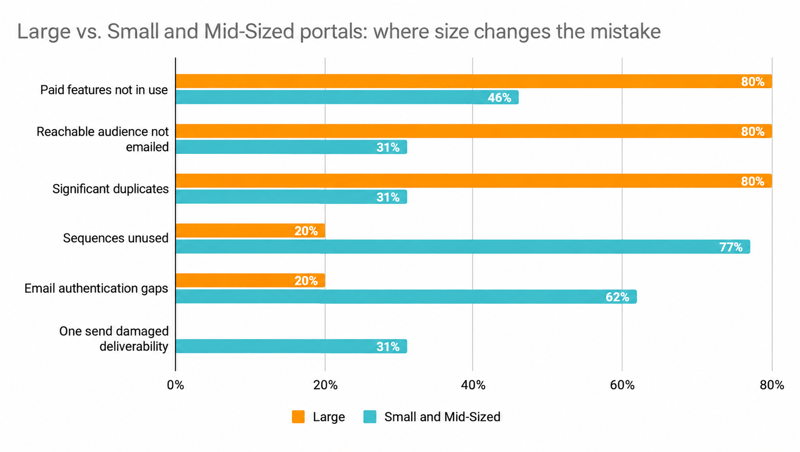
How does portal size change the mistakes?
Both groups hit 100% on attribution gaps and lifecycle problems. The differences show up elsewhere.
|
Finding |
Large |
Small and Mid-Sized |
|---|---|---|
|
Paid hub, add-on, or feature not in use |
80% |
45% |
|
Large reachable audience never emailed |
80% |
30% |
|
Significant duplicate records |
80% |
30% |
|
Sequences unused or used by one or two reps |
20% |
75% |
|
Email authentication or sending-domain gaps |
20% |
60% |
|
A single mass send damaged deliverability |
0% |
30% |
Large portals accumulate. They pay for features and audiences they do not use, and their data degrades as integrations, imports, and teams pile up. Every Large portal had workflow problems.
Small and Mid-Sized portals skip foundations. They are more likely to have incomplete email authentication, sales tools nobody adopted, and a single bad send that wrecked deliverability.
Every portal where automation was largely absent, and every portal with HubSpot tracking missing for months, was Small and Mid-Sized.
|
The portals between 25,000 and 75,000 records showed the accumulation problems of Large portals, with every one paying for contacts it did not email and every one carrying workflow problems. They also showed the setup gaps of Small portals, with most missing email authentication or a dedicated sending domain. This group is too small to report as a statistic, so treat it as a pattern to watch. If your portal is in this range, check both lists. |
What are the top 10 things you should fix in your HubSpot portal in the next 30 days?
In priority order. Most of these take under an hour.
- Require a contact on every new deal, and backfill closed-won deals.
- Build the workflow that moves bounces and unsubscribes to non-marketing status.
- Write and agree on lifecycle stage definitions.
- Reconnect every ad account and confirm spend shows contacts and deals.
- Complete SPF, DKIM, and DMARC, and set up an email subdomain.
- Confirm the HubSpot tracking code is live everywhere, and connect GA4 and Google Search Console.
- Reassign every workflow, list, and dashboard owned by someone who has left.
- Audit seats and marketing contacts 90 days before renewal, and turn off auto-renewal.
- Turn on native enrichment and run the duplicate manager.
- Remove connected apps nobody can explain.

What is the full data behind this report?
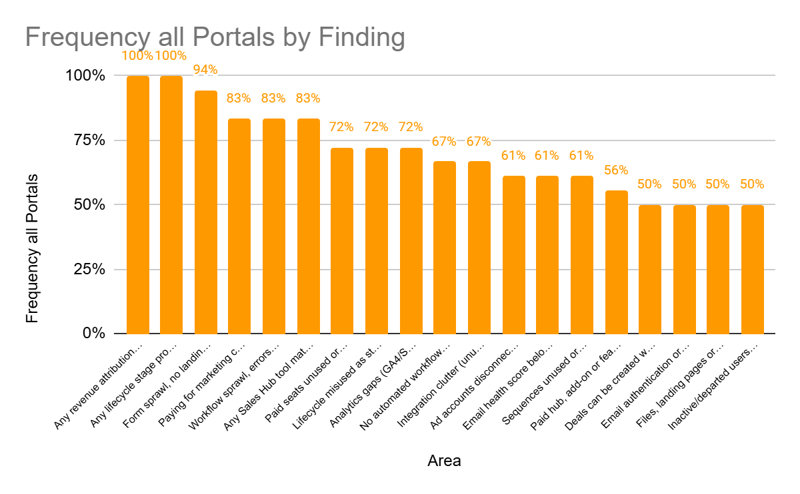
Share of audited portals where each finding was documented, rounded to the nearest 5%. Unrounded figures, the coding for each audit, and specific supporting numbers are in the companion dataset.
Summary
Details
|
Area |
Finding |
All |
Large |
Small and Mid-Sized |
|---|---|---|---|---|
|
Subscription and seats |
Paying for marketing contacts that are undeliverable or never emailed |
85% |
100% |
75% |
|
Subscription and seats |
No automated workflow moving bounces or unsubscribes to non-marketing |
65% |
60% |
70% |
|
Subscription and seats |
Paid seats unused or mismatched to role |
70% |
80% |
70% |
|
Subscription and seats |
Paid hub, add-on or feature not in use |
55% |
80% |
45% |
|
Attribution |
Deals can be created without a contact (or many deals have none) |
50% |
40% |
55% |
|
Attribution |
No usable deal data in HubSpot (no deals or deal sync failing) |
10% |
20% |
10% |
|
Attribution |
Ad accounts disconnected or ad spend not tracked to contacts or deals |
60% |
60% |
60% |
|
Attribution |
Workflows or integrations overwriting source or attribution data |
30% |
40% |
25% |
|
Attribution |
Any revenue attribution gap |
100% |
100% |
100% |
|
Lifecycle stages |
Lifecycle stages left at defaults, never configured |
15% |
0% |
25% |
|
Lifecycle stages |
Lifecycle misused as status field, sprawled, or undefined custom stages |
70% |
80% |
70% |
|
Lifecycle stages |
No working MQL definition or process |
40% |
60% |
30% |
|
Lifecycle stages |
Any lifecycle stage problem |
100% |
100% |
100% |
|
|
Email health score below target (under 6 of 10) |
60% |
60% |
60% |
|
|
A single mass send measurably damaged deliverability |
20% |
0% |
30% |
|
|
Email authentication or sending-domain gaps (SPF or DKIM, no subdomain, default web-version domain) |
50% |
20% |
60% |
|
|
Large reachable audience not being emailed |
45% |
80% |
30% |
|
Data quality |
Significant duplicate records |
45% |
80% |
30% |
|
Data quality |
Native data enrichment off, unused, or conflicting with another tool |
40% |
40% |
40% |
|
Data quality |
External CRM or ERP sync with errors (Salesforce, NetSuite, Zapier) |
20% |
20% |
25% |
|
Automation |
Workflow sprawl, errors, zombies or broken routing |
85% |
100% |
75% |
|
Automation |
Automation largely absent |
15% |
0% |
25% |
|
Sales tools |
Sequences unused or used by only one or two reps |
60% |
20% |
75% |
|
Sales tools |
Any Sales Hub tool materially underused (sequences, snippets, playbooks, docs, meetings) |
85% |
60% |
90% |
|
Website and tracking |
Analytics gaps (GA4 or Search Console not connected, GA3, tracking code missing) |
70% |
60% |
75% |
|
Website and tracking |
HubSpot tracking code missing or disconnected for months |
15% |
0% |
25% |
|
Website and tracking |
Files, landing pages or email web version on default HubSpot domain |
50% |
60% |
45% |
|
Website and tracking |
Blog or website off HubSpot, missing native newsletter or social automation |
45% |
40% |
45% |
|
Website and tracking |
Form sprawl, no landing pages for paid, or pop-ups or CTAs unused |
95% |
100% |
90% |
|
Governance and integrations |
Inactive or departed users, broad Super Admin, or vendor seat sprawl |
50% |
40% |
55% |
|
Governance and integrations |
Integration clutter (unused, expired, or unverified connected apps) |
65% |
80% |
60% |
|
Governance and integrations |
Service Hub or knowledge base paid or started but not used |
35% |
20% |
40% |
|
Governance and integrations |
AI features off, AI credits unused, or AEO not set up |
35% |
20% |
40% |